PlatformAI agent monitoring
See what your AI agents do, before it reaches production.
Follow every agent run step by step: the model calls, tools, MCP servers and commands it used, what it changed in production, what it cost, and whether the agent is up or down and why. Risky actions can wait for a manager's approval.
What is AI agent monitoring?
An AI agent does more than answer a question: it plans, calls tools, runs commands and queries, and can change real systems on its own. Monitoring an agent means seeing each of those steps, knowing which ones touched production or sensitive data, what each run cost, and whether the agent is still working.
Televane reads the OpenTelemetry your agent framework produces, turns each run into a step-by-step timeline, flags production changes and security events, and lets you require a person's approval before risky actions run.
Every run, step by step
From the OpenTelemetry your agent framework already produces.
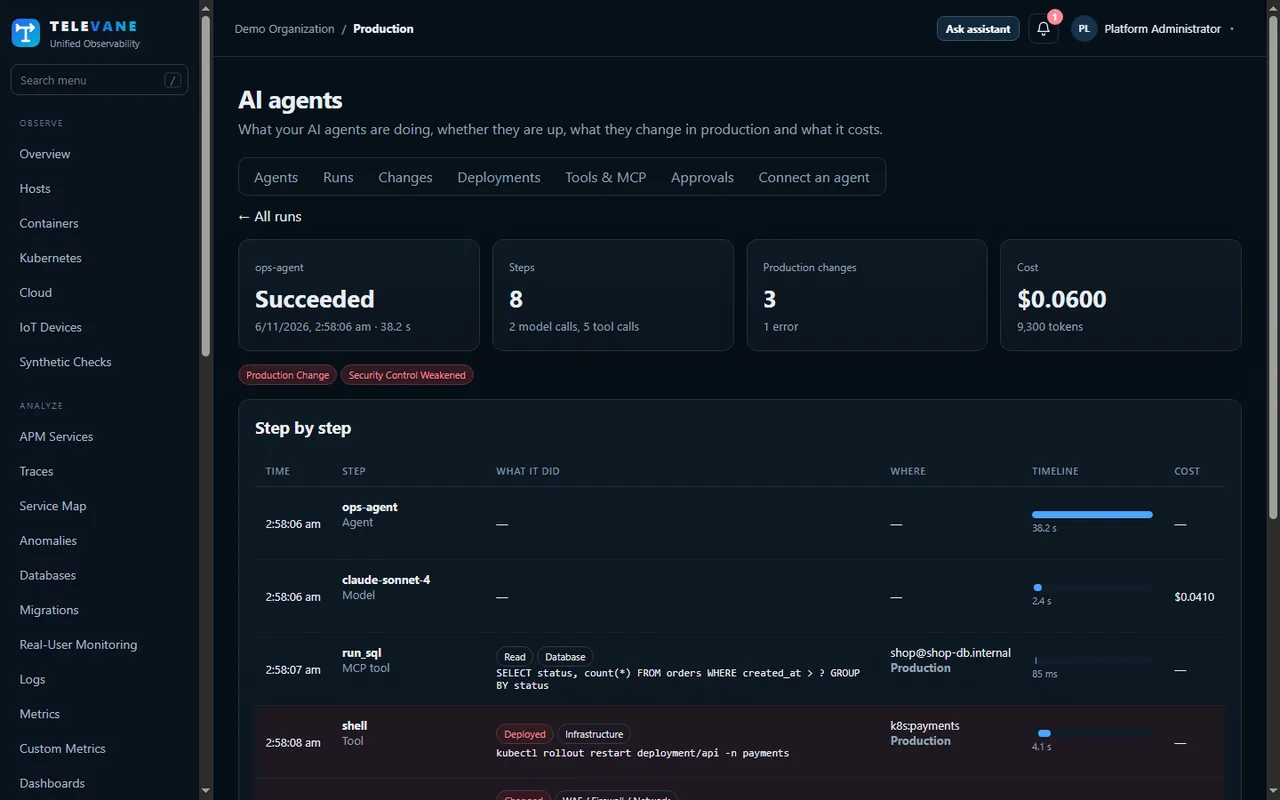
- Runs with every model call, tool call, MCP call and retrieval in order, with duration, errors and cost
- Each action classed as read, code execution, write, external send, deploy or destructive — from the SQL, HTTP method, command or tool name
- Agents, tools and MCP servers listed with their calls, failures and latency
- OpenAI Agents SDK, LangChain and LangGraph, LlamaIndex, CrewAI, or any agent using the OpenTelemetry GenAI conventions
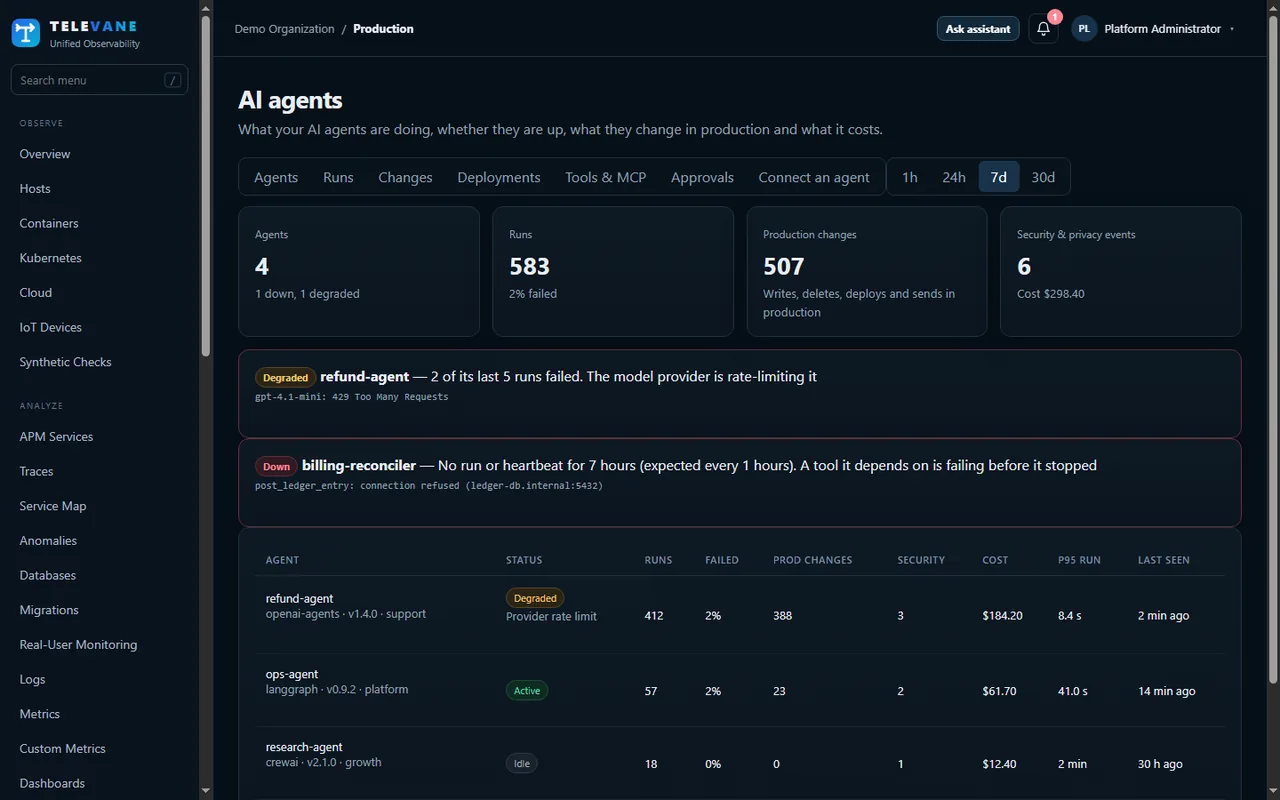
Production impact, security and privacy
Know when an agent touches something that matters.
- Changes to production by area — database, application, infrastructure, WAF, firewall and DNS, identity and access, payments, messaging, files and source code
- Production recognised from deployment.environment or your own host and database name patterns
- Security flags — security controls changed, privileges granted, secrets read, personal data read or sent outside, and possible prompt injection in tool results
- Commands and SQL kept with secrets and literal values masked; tool results checked for prompt injection, not kept
Approvals by policy
The agent asks first, a person decides.
- Policies by agent, tool, action, area, security flag, environment or cost — notify, require approval or block
- The agent asks the Televane API before acting and waits for allowed, rejected or pending
- Approvers by role or email, notified in the portal and by email, with an expiry
- No one can approve a request they made; every decision is recorded with a comment
Health with the root cause
Up, idle, degraded or down — and why.
- Expected run interval set by you or learned from the agent's history, plus an optional heartbeat
- Root cause from the last failure — provider rate limit, authentication or outage, failing tool, timeout, budget or loop
- Deployments compared version by version — failure rate, cost per run, latency and new security events
- Alerts for agent down, failure rate, production changes, security events, loops, cost per run, regressions and tool errors
Get started in three steps
- Create a free account — Sign up at portal.televane.com. The Free plan needs no card, and new organizations can try Pro free for 14 days.
- Connect the agent — Open AI Agents, then Connect an agent. Pick your framework and copy the lines shown there, with an ingest token from API Keys.
- Add policies and alerts — Mark your production hosts and databases, add approval policies for risky actions and turn on agent alerts.
Works together with
AI agent monitoring: common questions
Which agent frameworks work with Televane?
Any agent that sends OpenTelemetry traces with the GenAI conventions, and the OpenInference or OpenLLMetry instrumentation for the OpenAI Agents SDK, LangChain, LangGraph, LlamaIndex and CrewAI.
How does Televane know an action affects production?
From the deployment.environment of the agent's telemetry, or from host and database name patterns you set. Any step in production that is not a read counts as a production change.
Can an agent be stopped before a risky action?
Yes. The agent asks the Televane approvals API before acting. A policy can allow it, block it, or hold it until an approver decides.
What does agent monitoring keep about each step?
The kind of step, the tool, the command, SQL or target with secrets and literal values masked, timing, errors and cost. Tool results are checked for signs of prompt injection but not kept.
Which plans include it?
Pro, Business and Enterprise, and the 14-day Pro trial.
Try it on your own systems
Create a free account, install the agent with one command and see your data in minutes. 14-day Pro trial, no card needed.
Start free